Your training, on the home screen
Two widgets that put your running data on the home screen — a latest run glance and a weekly stats summary with a trend sparkline. No app launch required.
Opening an app just to check a number you already half-know is a small friction, but it adds up. Did I hit my distance goal this week? How far was yesterday’s run? These are one-second questions that shouldn’t require a four-tap answer.
Apex Run has two home screen widgets for exactly this.
Latest Run
A glance at your most recent run — distance, pace, duration, date — without unlocking anything beyond your home screen. Available in small and medium sizes. Small gives you the headline numbers; medium adds a bit more detail.
Useful for the morning after a run, when you want to remember what you actually did before the day wipes it.
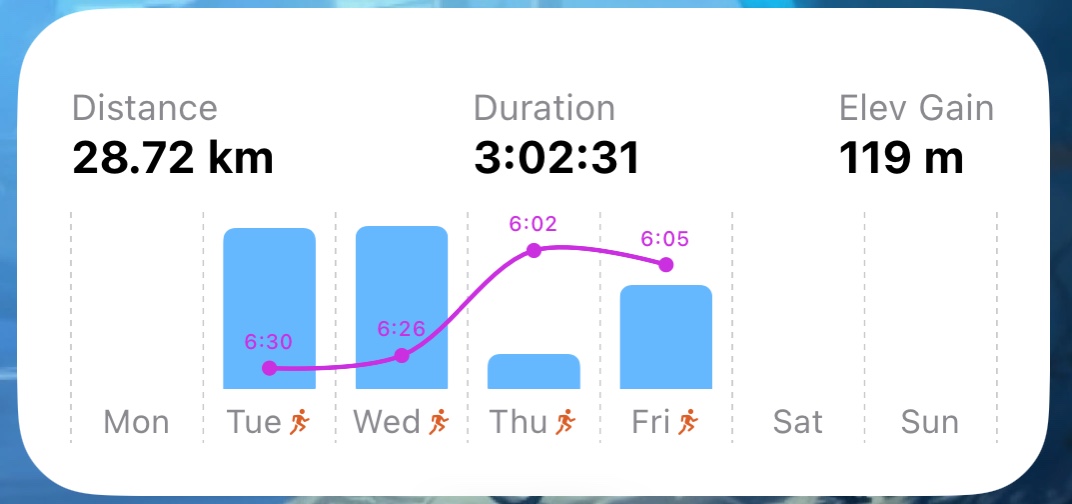
Weekly Stats
The stats widget shows your key training numbers for the current week, alongside a sparkline — a small trend curve of a metric(can be configured in widget settings). At a glance you can see not just where you are this week, but whether you’re trending up, holding steady, or backing off.
Tap the widget and it opens directly to the Stats View inside the app for the full breakdown.
Also available in small and medium sizes.
Why widgets work for running
Running is a habit measured in weeks and months. The home screen is something you look at dozens of times a day. Putting your training data there — passively, without any action required — means you’re always loosely aware of where you are in your week. That awareness, low-effort as it is, has a way of keeping you honest.